Wrike Project Management Guide | LearnersKart
-
September 11, 2025
Wrike Project Management: Everything You Need to Know
In today’s fast-paced business world, effective project management is the key to delivering results on time, within budget, and with full team alignment. Among the many tools available, Wrike has become a popular choice for organizations that want to streamline collaboration and increase productivity.
At LearnersKart, we help professionals and organizations explore powerful tools like Wrike to drive project success.
🔑 What is Wrike?
Wrike is a cloud-based project management and collaboration platform that allows teams to plan, organize, track, and deliver projects more efficiently. It combines task management, communication, workflow automation, and reporting—all in one tool.
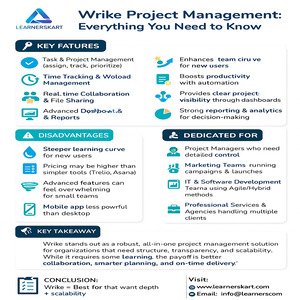
🌟 Key Features of Wrike
-
Task amp; Project Management – Assign tasks, set deadlines, and prioritize work.
-
Time Tracking amp; Workload Management – Monitor progress and balance resources effectively.
-
Gantt Charts amp; Kanban Boards – Visualize workflows and project timelines.
-
Real-time Collaboration – Share files, comment on tasks, and track changes instantly.
-
Custom Workflows amp; Automation – Save time by automating repetitive processes.
-
Dashboards amp; Reports – Get real-time visibility into project health.
-
App Integrations – Connect with Slack, Microsoft Teams, Google Drive, Salesforce, and more.
✅ Advantages of Wrike
-
Enhances team collaboration amp; communication
-
Improves productivity through automation
-
Provides real-time visibility of project progress
-
Scalable from small teams to enterprise-level organizations
-
Robust reporting amp; analytics for data-driven decision making
⚠️ Disadvantages of Wrike
-
Steeper learning curve for beginners
-
Pricing can be higher compared to lightweight tools (like Trello or Asana)
-
Advanced features March overwhelm small teams
-
Mobile app functionality is limited compared to desktop
🎯 Who is Wrike Best For?
Wrike is ideal for:
-
Project Managers who need detailed control
-
Marketing Teams running campaigns and product launches
-
IT amp; Software Development Teams using Agile/Hybrid methodologies
-
Professional Services amp; Agencies managing multiple clients
-
Remote amp; Hybrid Teams that need real-time visibility
📝 Conclusion
Wrike stands out as a powerful, all-in-one project management solution that offers structure, scalability, and transparency. While it March take some time to master, the benefits are clear—better collaboration, smarter planning, and on-time delivery.
🔑 Key Takeaways
-
Wrike = Best for teams that need depth + scalability
-
Great for organizations seeking automation, reporting, and visibility
-
Not ideal if you want a lightweight, plug-and-play tool
-
Perfect for fast-growing teams managing complex projects
✨ At LearnersKart, we empower professionals with the right knowledge and training to use tools like Wrike effectively and achieve project success.
📩 Connect with us:
🌐 Visit: learnerskart.com | #x1f4e7; Email: info@learnerskart.com
✔️ Follow us for more project management tips amp; career insights! https://lnkd.in/gYB4Dw4K
Tags:
Agile Project ManagementCollaboration SoftwareEnterprise Project ManagementLearnersKartProductivity Toolsproject deliveryProject Efficiencyproject executionproject leadershipProject Management Toolsproject planningProject SuccessProject TrackingRemote Team Collaborationtask managementTeam CollaborationWork ManagementWorkflow AutomationWrikeWrike Project Management
You May Also Like
-
Mar 20, 2026
Introduction In today’s competitive and fast-paced business environment, delivering projects successfully is more challenging than ever. Many projects fail—not due...
-
Mar 18, 2026
Most PMP aspirants believe success comes from memorizing the PMBOK® Guide and solving hundreds of questions. But here’s the truth:...
-
Mar 17, 2026
In many organisations, the role of a Project Manager is often misunderstood. Some people believe that a great Project Manager...
-
Mar 9, 2026
The Project Management Institute (PMI) has announced a major update to the Project Management Professional (PMP®) certification exam, effective March...
Sign up to receive our latest updates
Company
Support
Service Offerings
Special Offers
Get in touch
India
Call us directly?
+91-984-459-1589
Address
Learnerskart Solutions Pvt Ltd
4th floor, No: 207/189, 9th Main Rd, 6th Sector,
HSR Layout, Bengaluru, Karnataka 560102
info@learnerskart.com
USA
Call us directly?
+1 (307)-998-3816
Address
Learnerskart Americas LLC
30 N Gould St Ste R
Sheridan, WY 82801
info@learnerskart.com
Quick Contact
Trending Categories
Disclaimer
“PMI®”, “PMBOK®”, “PMP®”, “CAPM®” and “PMI-ACP®” are registered marks of the Project Management Institute, Inc.
ITIL® and PRINCE2® are registered trade marks of AXELOS Limited, used under permission of AXELOS Limited. All rights reserved.
“CSM”, “CST” are Registered Trade Marks of The Scrum Alliance, USA.
