Best Project Management Tools for Career Switchers & Aspiring PMs
-
May 7, 2026
Breaking into project management—or leveling up within it—doesn’t just depend on theory. It’s about how effectively you plan, collaborate, track, and deliver results. The right set of tools can dramatically shorten your learning curve, boost productivity, and make you stand out in a competitive job market.
Whether you’re transitioning from another career or starting fresh, this guide walks you through the most impactful project management tools and how they can accelerate your growth.
🚀 Why Tools Matter in Project Management
Project managers are expected to juggle multiple responsibilities—deadlines, stakeholders, resources, risks, and communication. Without the right tools, even experienced professionals struggle.
The right tools help you:
- Stay organized and meet deadlines
- Improve team collaboration
- Track progress in real time
- Make data-driven decisions
- Deliver projects successfully
More importantly, they help you think like a project manager, which is crucial if you’re switching careers.
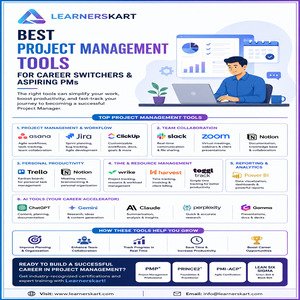
🧩 1. Project Management amp; Workflow Tools
🔹 Asana
A favorite for teams practicing Agile and structured workflows.
Best for: Task tracking, team collaboration, workflow automation
Key features: Timelines, boards, automation, reporting
Why it’s great: Easy to use and widely adopted across industries
🔹 Jira
A powerful tool mainly used in software development environments.
Best for: Agile teams, sprint planning, bug tracking
Key features: Scrum boards, backlog management, advanced reporting
Why it’s great: Essential if you’re targeting IT or tech-based PM roles
🔹 ClickUp
An all-in-one platform with high customization.
Best for: Resource management and flexible workflows
Key features: Docs, goals, dashboards, time tracking
Why it’s great: Replaces multiple tools in one platform
💬 2. Team Collaboration Tools
🔹 Slack
A go-to communication platform for modern teams.
Best for: Real-time communication and updates
Key features: Channels, integrations, file sharing
Why it’s great: Keeps team conversations organized and searchable
🔹 Zoom
Still essential for remote teams and client interactions.
Best for: Meetings, webinars, presentations
Key features: Screen sharing, recordings, breakout rooms
Why it’s great: Reliable and widely used across industries
🔹 Notion
A flexible workspace for documentation and knowledge sharing.
Best for: Notes, documentation, collaboration
Key features: Databases, templates, wikis
Why it’s great: Combines docs, tasks, and knowledge management
📌 3. Personal Productivity Tools
🔹 Trello
A simple and visual Kanban-based tool.
Best for: Personal task management
Key features: Boards, cards, checklists
Why it’s great: Perfect for beginners learning workflow management
🔹 Notion (again!)
Yes, it deserves a second mention.
Best for: Brainstorming, meeting notes, personal organization
Why it’s great: Helps you build a second brain for your ideas
⏱️ 4. Time amp; Resource Management Tools
🔹 Wrike
Advanced project tracking with real-time insights.
Best for: Team performance and workload management
Key features: Gantt charts, dashboards, analytics
🔹 Harvest
Simple and effective time tracking.
Best for: Tracking billable hours and productivity
Key features: Time logs, invoicing
🔹 Toggl Track
A clean and minimal time tracking tool.
Best for: Freelancers and individuals
Key features: Reports, integrations, tracking reminders
📊 5. Reporting amp; Analytics Tools
🔹 Power BI
A powerful data visualization tool.
Best for: Data analysis and reporting
Key features: Dashboards, data modeling, real-time insights
Why it’s great: Helps PMs make informed decisions
🤖 6. AI Tools (Your Career Accelerator)
AI tools are changing how project managers work.
- ChatGPT / Gemini / Claude → For documentation, planning, and research
- Perplexity AI → For quick, accurate research
- Gamma → For presentations and documentation
Why they matter:
They help you work faster, smarter, and with better insights—something every modern PM needs.
🔄 How These Tools Help in Career Transition
If you’re switching careers, tools become your bridge to real-world experience.
Here’s how:
- Practice Agile workflows using Jira or Asana
- Manage mock projects using Trello or ClickUp
- Document processes using Notion
- Track productivity using Toggl or Harvest
This builds practical experience, even before your first PM job.
🌱 Final Thoughts
The right tools don’t just improve efficiency—they transform your mindset.
They help you:
- Think structurally
- Communicate effectively
- Lead with confidence
- Deliver results consistently
But tools alone aren’t enough.
To truly succeed as a Project Manager, you need:
- Structured learning
- Industry-recognized certifications
- Real-world guidance
🎓 Start Your Project Management Journey with Learnerskart
If you’re serious about building a successful career in project management, combining the right tools with the right training is the key.
Learnerskart offers industry-recognized certification training programs including:
- PMP® (Project Management Professional)
- PRINCE2® Foundation amp; Practitioner
- PMI-ACP® (Agile Certification)
- Lean Six Sigma (Green Belt amp; Black Belt)
✅ Live interactive sessions
✅ Real-world case studies
✅ Mock exams amp; application support
✅ Designed for working professionals
📩 Connect with us:
🌐 Visit: www.learnerskart.com | #x1f4e7; Email: info@learnerskart.com
✔️ Follow us for PM tips amp; career insights: https://lnkd.in/gYB4Dw4K
Tags:
Agile project management toolsai tools for project managersasana toolasana vs jira vs clickupbest project management tools 2026career switch to project managementclickup featuresJira Softwarenotion workspacePM tools listpower bi reportingproductivity tools for managersproject management for beginnersProject Management Toolsproject manager career growthslack communication toolteam collaboration toolstools for project managerstrello kanbanzoom meetings tool
You May Also Like

-
Jun 3, 2026
In today’s fast-paced and highly competitive business environment, organizations are constantly striving to achieve strategic goals, improve operational efficiency, and...
-
Jun 2, 2026
In many organizations, project management is often associated with schedules, trackers, dashboards, status reports, and governance meetings. While these tools...
-
May 8, 2026
Managing projects today is more complicated than ever. Project managers are expected to track schedules, budgets, resources, risks, issues, deadlines,...
-
May 6, 2026
In today’s fast-paced project environments, success isn’t driven by tools, dashboards, or methodologies alone. While frameworks like Agile or predictive...
Sign up to receive our latest updates
Company
Support
Service Offerings
Special Offers
Get in touch
India
Call us directly?
+91-984-459-1589
Address
Learnerskart Solutions Pvt Ltd
4th floor, No: 207/189, 9th Main Rd, 6th Sector,
HSR Layout, Bengaluru, Karnataka 560102
info@learnerskart.com
USA
Call us directly?
+1 (307)-998-3816
Address
Learnerskart Americas LLC
30 N Gould St Ste R
Sheridan, WY 82801
info@learnerskart.com
Quick Contact
Trending Categories
Disclaimer
“PMI®”, “PMBOK®”, “PMP®”, “CAPM®” and “PMI-ACP®” are registered marks of the Project Management Institute, Inc.
ITIL® and PRINCE2® are registered trade marks of AXELOS Limited, used under permission of AXELOS Limited. All rights reserved.
“CSM”, “CST” are Registered Trade Marks of The Scrum Alliance, USA.
